
INTRODUCTION
User Experience (UX) refers to the overall experience a user has while interacting with a website or digital product. It encompasses aspects like usability, accessibility, performance, design/aesthetics, utility, ergonomics, overall human interaction, and marketing.
For bloggers, UX is crucial because it directly impacts reader engagement and satisfaction. A positive UX can keep readers on your blog longer, encourage them to explore more content and convert them into regular visitors or subscribers. It can also influence your blog’s search engine rankings, as search engines tend to favor websites that offer a good user experience. In essence, prioritizing UX is about making your blog more effective, enjoyable, and successful.
Because of the impact UX can have on the target audience it is important you spend time on getting it right. This course will go through some basics about UX and design for whatever type of blog you are creating.
THE LOOK AND FEEL
THE DESIGN AND THEME
The ‘look’ of your blog plays a significant role in attracting and retaining readers. First impressions leave lasting impressions and impact on the reader’s overall perception of your product. It can greatly influence their impression of your blog’s quality and authority. A well-designed blog with a visually appealing layout, harmonious color scheme, readable fonts, and high-quality images engages readers, making them more likely to explore your content and return for more.
Be sure to include your brand iconography and the colors and fonts you have chosen to represent your brand. This must be consistent through all of the design elements of your product.
The ‘feel’ of your blog is about how readers interact with it. It’s about ensuring that your blog is not just visually appealing, but also intuitive and engaging.
THE UTILITY OF YOUR SITE
navigation
Breadcrumbs: These are a secondary navigation scheme that reveals the user’s location in a website’s hierarchy. They’re especially useful for websites with a large amount of content organized in a hierarchical manner.
Navigation Menu: This is a crucial element that should be clear and consistent across all pages. It can be horizontal or vertical, but it should include links to all the main sections of your website.
Search Bar: A prominently placed search bar allows users to quickly find the content they’re looking for by typing in keywords.
Footer Navigation: This is a secondary navigation area at the bottom of the page that typically includes links to important pages like the About, Contact, Privacy Policy, and Terms of Service pages.
Sidebar Navigation: This can be used to provide links to related content, recent posts, or other important sections of the site.
Dropdown Menus: These can be useful for sites with a lot of content, allowing you to group related pages under broader categories.
Pagination: For blogs or any site with a lot of content on one page, pagination helps users navigate through the content by breaking it up into multiple pages.
Back-to-Top Button: This allows users to quickly navigate back to the top of the page, which is especially useful for long pages.
Hyperlinks: Links within your content to other relevant pages on your site can help users explore more of your content and understand the structure of your site.
The first and most important design consideration is that it is built using a responsive design. In today’s digital age, people access content through various devices – desktops, laptops, tablets, and smartphones. A responsive design ensures your blog looks and functions well on any device. For example, on a mobile device, your blog should have easily clickable buttons, readable text without zooming, and images that load quickly.
You should include interactive elements like comment sections, social media share buttons, or even interactive quizzes. For example, a travel blogger might include a quiz about travel preferences to engage readers and provide personalized travel tips based on their answers.
PRODUCT CONSIDERATIONS
Your overall blog should have a clear and concise menu system, one that clearly segments the site into its main components and provides a constant awareness of where the user is. Elements like breadcrumbs
THE USER EXPERIENCE (UX)
The user experience UX is crucial to creating a product that people will want to come to
- QUALITY 76%
Your Title Goes Here
Day(s)
:
Hour(s)
:
Minute(s)
:
Second(s)
%
Your Title Goes Here
%
Your Title Goes Here
Table Title
Subtitle goes Here- This feature is included
- This feature is included
- This feature is included
- This feature is included
- This feature is not included
- This feature is not included
Table Title
Subtitle goes Here- This feature is included
- This feature is included
- This feature is included
- This feature is included
- This feature is not included
- This feature is not included
Your Title Goes Here
Day(s)
:
Hour(s)
:
Minute(s)
:
Second(s)
Your Title Goes Here
Your content goes here. Edit or remove this text inline or in the module Content settings. You can also style every aspect of this content in the module Design settings and even apply custom CSS to this text in the module Advanced settings.
%
Your Title Goes Here
YOUR OVERALL LOOK AND FEEL
Stay on-brief. text of the printing and typesetting industry. Lorem Ipsum has been the industry’s standard dummy text ever since the 1500s, when an unknown printer took a galley of type and scrambled it to make a type specimen book. It has survived not only five centuries, but also the leap into electronic
DESIGN WITH DIVI
Your content goes here. Edit or remove this text inline or in the module Content settings. You can also style every aspect of this content in the module Design settings and even apply custom CSS to this text in the module Advanced settings.
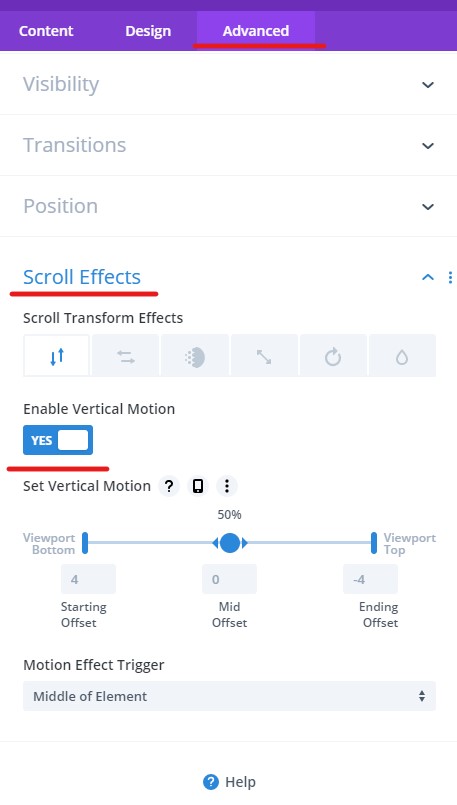
Scroll Affects
ENHANCED SITE NAVIGATION
Navigating a page with page anchors
Navigating to a different page and anchor on that page
Add a “Back to Top” of page button
Filtering
https://www.elegantthemes.com/marketplace/divi-filter/
Tag Cloud Navigation