

Introduction
In this installment of Blogging Mastery, we delve into an intriguing case study: a tech magazine that presents a stark contrast between its PC and mobile experiences.
While the PC version is overwhelmed by excessive advertising, diminishing the user experience, the mobile version stands out for its smooth and engaging interface.
The site offers numerous valuable lessons for business bloggers. Join us as we explore Lifewire in-depth, analyzing its strengths and weaknesses to glean insights for our own blogging journeys.
The Pros
Lets start with the positives, which are neumerous.
The Branding.
The name and logo of the brand are exceptional. The name fulfills the critical criteria of a great brand name, communicating the essence of the brand in a straightforward and memorable manner.
The tagline, “Tech for Humans,” is equally impressive. It’s concise, direct, and inviting, bridging the gap between technology and everyday users. The font choice here is again noteworthy, and the use of all caps enhances its impact.
As for the logo, it’s a seamless blend of simplicity and style, consisting solely of the brand name in a clean, modern, and legible font, perfectly encapsulating the brand’s image.
The Banner
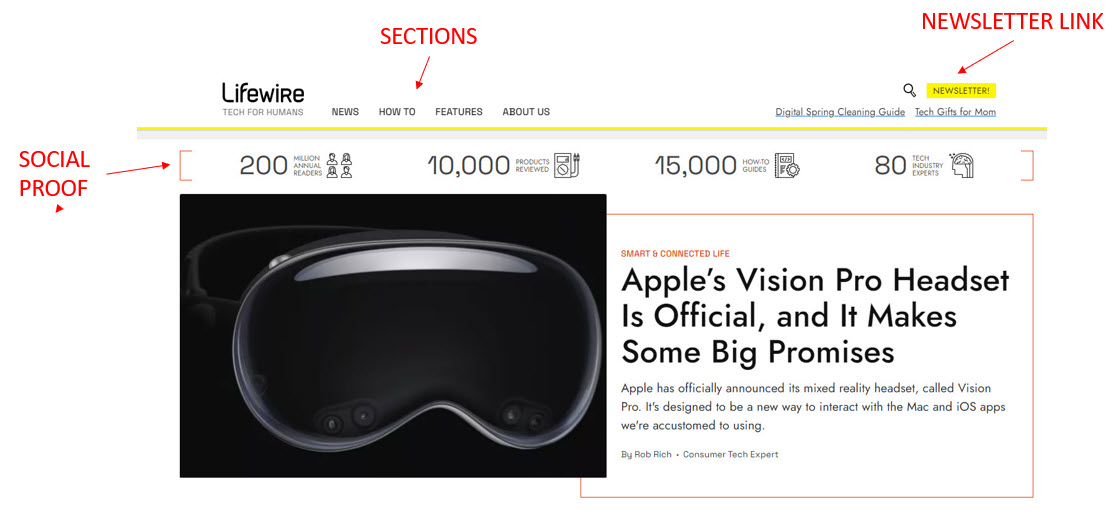
The banner design is elegantly minimalist and functional, encompassing all the essential elements. Positioned on the left, the logo anchors the design, while the menu, characterized by its clarity and ease of navigation, stretches across the banner.
On the right, there is a subtle but effective link to their newsletter. Two strategically placed links also lead to the main feature articles, completing this well-organized and user-friendly layout.
Social Proof
Immediately following the top banner (with a slight exception, which I’ll address later), there’s a row prominently showcasing the site’s impressive user engagement statistics. This includes the total annual readership, the number of products reviewed, the extensive library of how-to guides, and the count of tech industry experts contributing to the site.
This is an excellent strategy for establishing authority and fostering trust; once you’ve accumulated significant numbers to display.
Structure
The content on the site is meticulously organized into three primary categories: “News,” “How To,” and “Features.” Each category is divided into various subcategories or leading posts, creating a user-friendly experience reminiscent of flipping through a magazine.
The homepage content starts with a prominent lead article, followed by the latest news. It then branches into several key sections:
- Looking Ahead – This section provides a sneak peek into upcoming product releases, focusing on anticipated features.
- What We’re Into – Here, the spotlight is on the latest product tests and reviews.
- Software and Apps – A dedicated space for reviewing the newest apps.
- Tech Untangled – Articles designed to demystify technology, covering topics like using software such as MS Word.
- Latest in How-to – This section features the most recent how-to articles, offering practical guidance.
Additionally, an “About Us” section introduces the authors and outlines their editorial guidelines and policies. This section emphasizes the rigorous standards applied in product reviews and how-to explanations, establishing trust and authority with the readers.
UX
The website boasts a clean, contemporary design that is visually pleasing and aligns seamlessly with the modern tech aesthetic. The predominant use of white enhances this modern vibe.
The navigation system is impressively sleek and user-friendly, with intuitive pop-ups as you hover over each menu heading.
While the landing page maintains this clean and navigable design, there are moments when it feels somewhat cluttered and overly busy, potentially due to an excess of lines and colors. This clutter might also be attributed to the abundance of advertising, which can sometimes blur the distinction between content and commercials.
The Posts
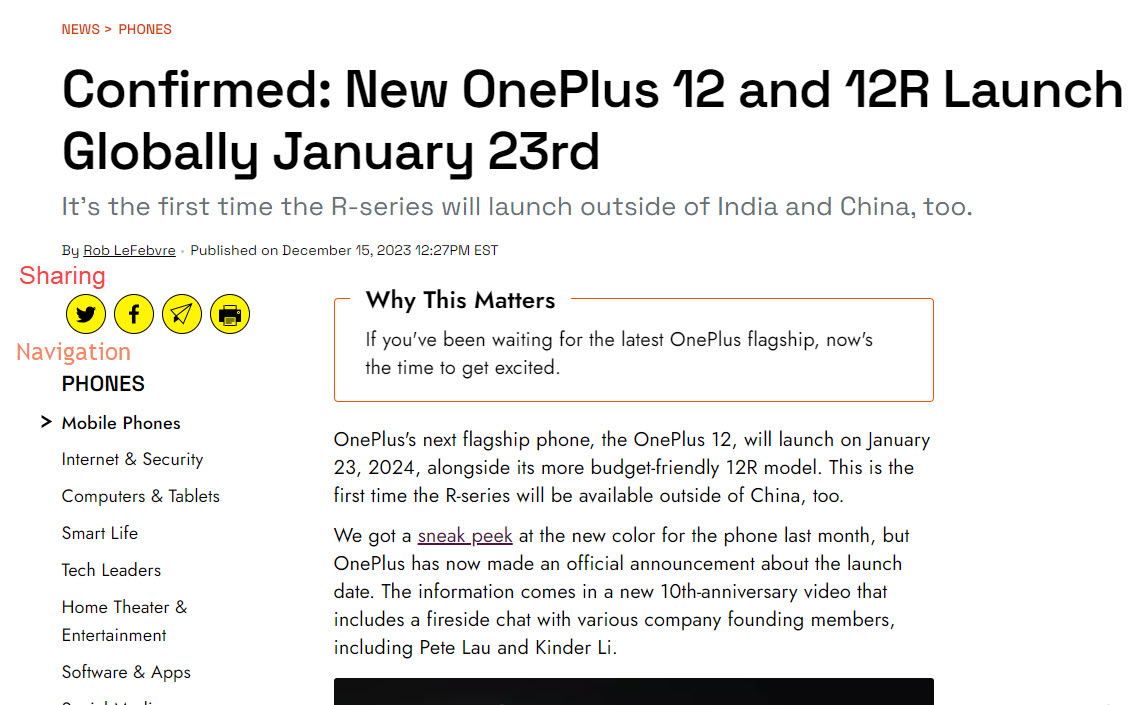
Posts are presented in a straightforward and familiar format, featuring a left-hand menu for easy navigation to different site sections. Social media sharing buttons are also conveniently placed, encouraging readers to easily share content.
Responsiveness
The site’s mobile adaptation is outstanding, a crucial feature in today’s digital landscape. In my opinion, the mobile experience surpasses the desktop experience significantly.
The focus on mobile optimization is a key component of their appeal and success, reflecting a crucial understanding of today’s media landscape, where mobile accessibility is paramount.
The Cons
Advertising
Advertising is necessary in the commercial world, and Lifewire relies on it for revenue. However, there’s a delicate balance between sufficient and excessive.
On the PC version, the sheer volume of ads, especially those with animations, creates a visually cluttered and distracting environment, making it difficult to focus on the content. This is not an uncommon issue in the realm of commercial online publishing.
A particularly intrusive form of advertising used by many sites, including Lifewire, is the “Leaderboard Ad” placed just below the top banner. This type of ad placement on the homepage significantly detracts from the site’s overall branding impression, giving it a cheaper feel. This is unfortunate because the quality of the content is high.
The prevalence of “Leaderboard Ads” is widespread, with even renowned publications like The New York Times (NYTs) utilizing them. In their approach, these ads are positioned “above the fold,” which is even more intrusive. On arrival at the NYT’s PC version, you first see an advertisement occupying more than a third of the screen space.
This speaks volumes about their prioritization, suggesting that these publications emphasize immediate ad revenue over the long-term impact on their brand identity and user experience.
They might be financially beneficial, but they erode the brand’s identity and significantly impact the aesthetic appeal.
Contrasting this experience with the cleaner, more user-friendly mobile version of Lifewire highlights the stark difference and the impact of excessive advertising on the user experience. The much-reduced landscape of the mobile version results in a slick and enjoyable experience.
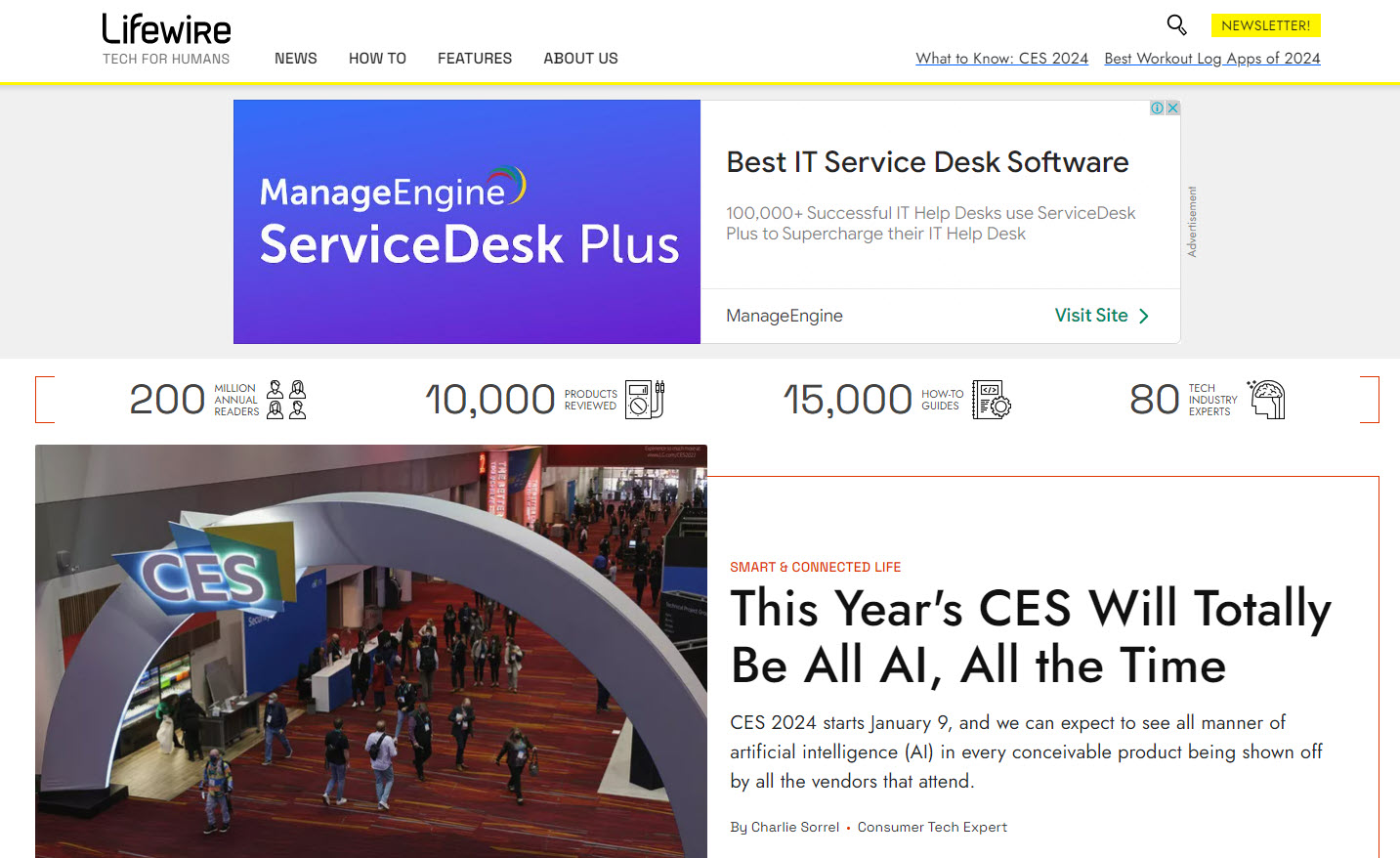
Am I on the Lifewire site or the Service Desk Plus site?
Now look at a typical post.
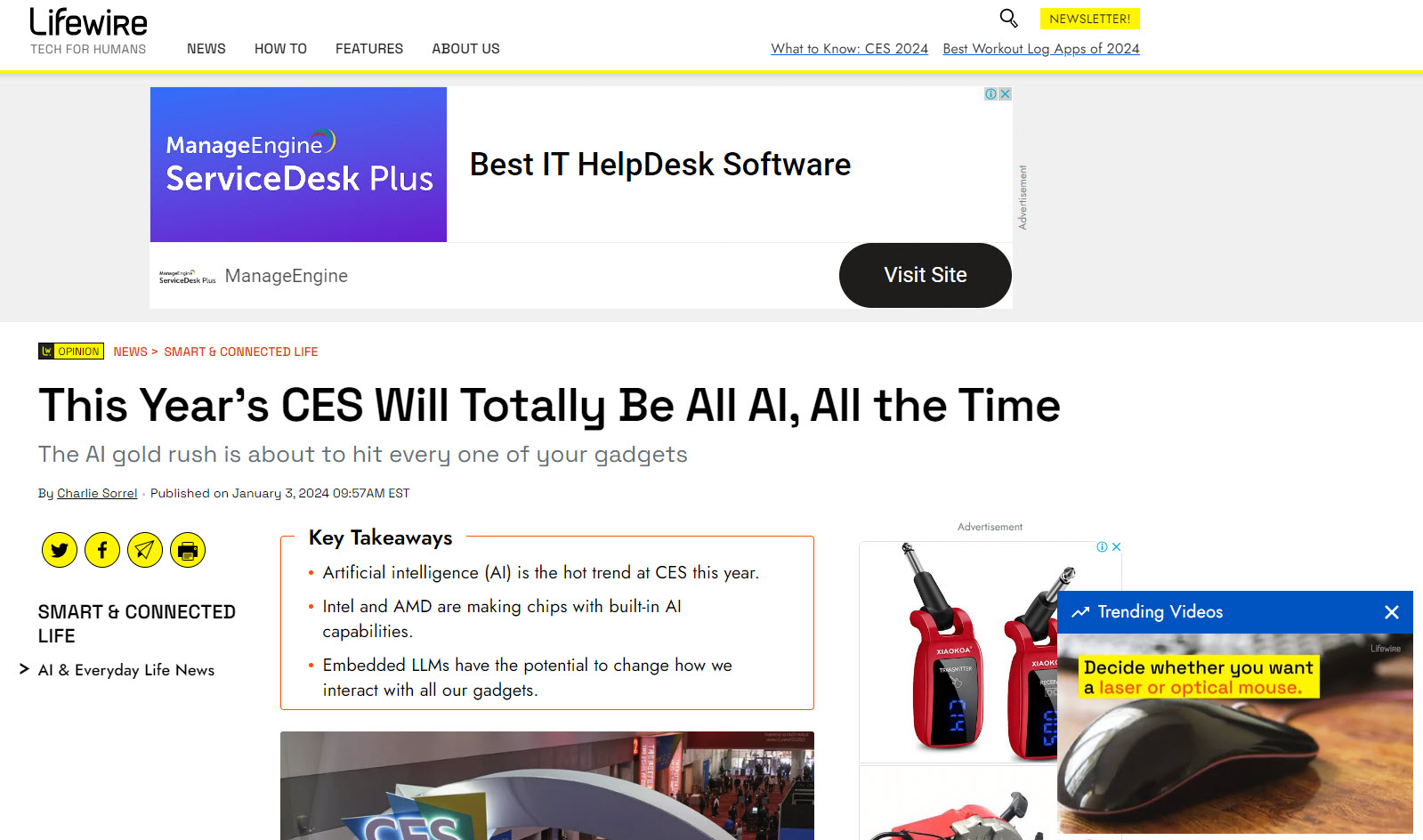
I really just do not know where to look. Ads, videos, social media, navigation links, images, and text make for a schizophrenic look and feel.
HOWEVER
When browsing the site on a phone, the experience is entirely different. In fact, it’s quite a pleasant and straightforward experience that is a joy to read.
On the phone – where did all the ads go?


Summary
I only use this site on my phone now. This is a bit annoying, given the large screen’s effectiveness – like a magazine cover. I understand that sites like these need to make money, but they have become so cluttered and crowded that the overall experience is subpar.
This contrasts with the genuinely enjoyable phone experience, transforming it into a platform that I am delighted to engage with.
There are several positives you should learn from this site:
- The exceptional branding is something to mimic,
- The content buckets which organize the material in a really sensible fashion,
- The UX is clean and easy to use,
- The responsiveness of the site is excellent. In fact, it’s better on the phone.
Remember, when integrating advertising into your website, it’s important not to let financial incentives overshadow design considerations. Prioritize your audience’s experience, striving for a balance that ensures the site remains enjoyable and easy to navigate.
The potential decline in readership due to excessive advertising might not be offset by the increased ad revenue and result in a net loss in audience engagement and overall site value.
Related Articles

Great Food Blogs – Part 1 – The Smitten Kitchen
Introduction In this issue of Blogging Mastery, we dive into the world of Smitten Kitchen - a blog site that attracts over 1 million monthly visits. With its impressive success, it serves as an excellent platform for business bloggers to; 'Learn from the...
0 Comments